

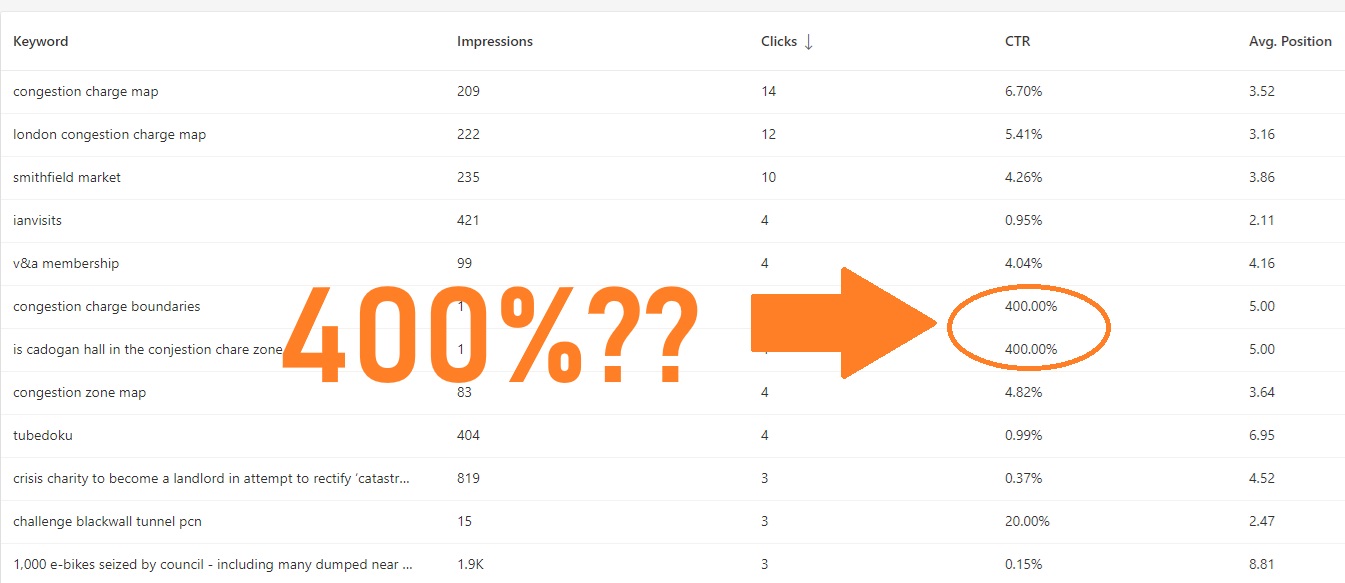
Yes, that is definitely weird, but you are not crazy. In the world of strictly logical mathematics, a Click-Through Rate (CTR) of 400% is impossible (you can’t click a link more times than you see it).
However, in the world of Google Search Console (GSC)-which is what this screenshot appears to be-this is a known anomaly.
Here is exactly why this is happening:
1. The Math Behind the Glitch
If you look closely behind your orange text overlay, the Impressions column for those rows appears to show the number 1. The formula for CTR is: $$CTR = \left( \frac{Clicks}{Impressions} \right) \times 100$$
So, the tool is calculating: $$ \left( \frac{4 \text{ clicks}}{1 \text{ impression}} \right) \times 100 = 400%$$
2. Why 4 Clicks for 1 Impression?
How can a user click a link 4 times if they only saw it once? There are three common reasons this happens in Search Console reports:
- Date Range Cutoffs (Most Likely): If a user performs a search at 11:59 PM (recording the Impression on Day 1) but clicks the link at 12:01 AM (recording the Click on Day 2), and you are only looking at the data for Day 2, you will see a Click with 0 (or mismatched) Impressions.
- Data Reporting Lag: Google processes Clicks and Impressions through different pipelines. Sometimes the click data arrives and is reported slightly faster than the impression data. Since these are very low-volume keywords (only 1 impression), the missing data is obvious.
- Browser Behavior: Occasionally, if a user opens a search result, goes back, clicks it again, goes back, and clicks it again, GSC usually filters this out, but sometimes (especially with spotty connections or certain mobile browsers) it registers multiple clicks for a single search session impression.
Summary
You are looking at a data sync artifact caused by extremely low sample sizes. Because the numbers are so small (1 impression, 4 clicks), a tiny discrepancy in timing creates a massive percentage error.
My recommendation: You can safely ignore these specific rows. They are statistical noise and don’t reflect a problem with your site.